
HelloHabit - Habit Tracker
RightLife, Inc.Productivity
4.5274.00 Reviews
- Version
- 3.1.2
- Installs
- 100.00K
- Age Rating
- Everyone
Screenshots
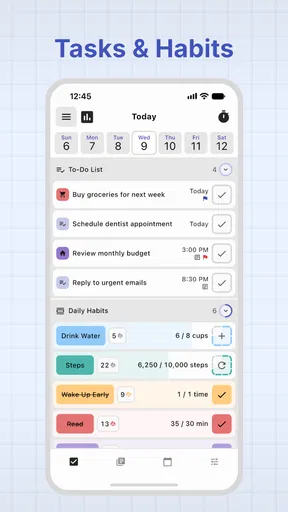
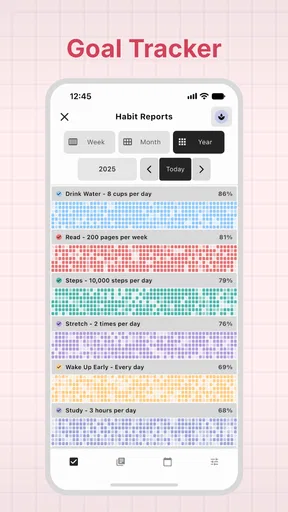
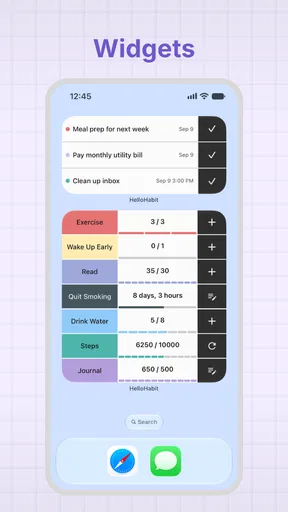
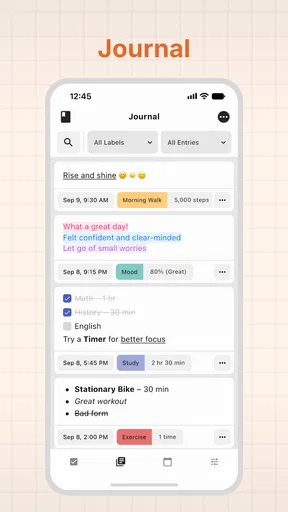
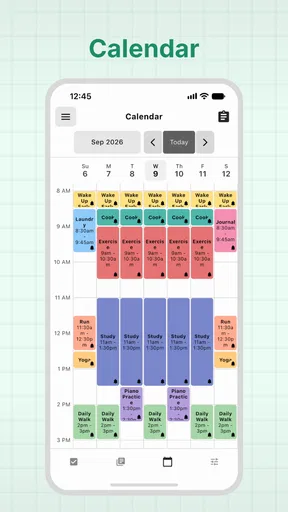
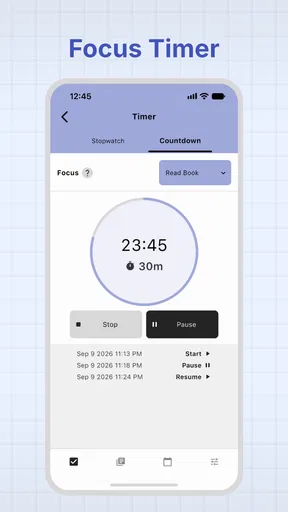
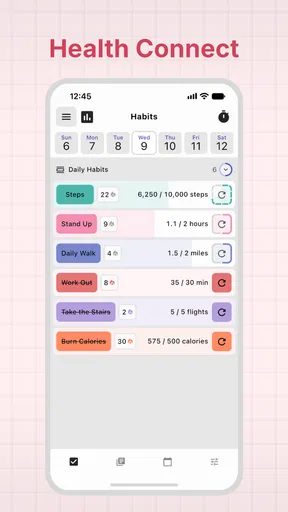
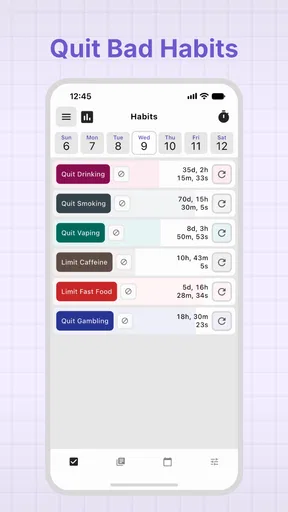
Our Review of HelloHabit - Habit Tracker
 Analysis by Appyee
I approached HelloHabit as a practical productivity app rather than a motivational toy. Its purpose is straightforward: help me organize daily routines, keep a to-do list visible, and use streaks as a reason to return. That combination makes sense for anyone who wants more structure without building a complicated planning system from scratch. After spending time with it, I found the strongest part is the way it turns vague intentions into small, repeatable actions.
The app comes from RightLife, Inc. and is available free of charge, although optional in-app purchases range from $4.99 to $59.99 per item. It is listed for Everyone, which fits the calm, general-purpose nature of the experience. The current release is version 3.1.2, and the app has already passed 100K installs with an average rating of 4.5 from around 7K ratings. Those figures suggest that it has found a real audience, but they do not replace personal fit: a habit tracker can be well liked and still feel too simple or too structured for a particular routine.
How HelloHabit feels during everyday use
I found HelloHabit most useful when I treated it as a brief daily checkpoint, not a system that should organize every part of my life. Its mix of recurring habits, one-off tasks, and streaks invites me to notice whether a routine fits the day rather than simply collect checkmarks. That distinction matters when plans change: I can adjust what I expect from myself, then consider how the app’s free starting point and optional purchases affect its value.
A quick start matters more than flashy design
The first thing I noticed is that HelloHabit is built around reducing the distance between thinking about a task and recording it. That matters because habit apps often fail before the habit even begins. If creating an entry feels like planning a project, I am less likely to use it consistently. Here, the daily-planner approach gives me a clear place to put recurring actions, while the to-do format is better suited to things that need attention once rather than forever.
That distinction is more useful than it may sound. I can treat “take a short walk” as a repeating behavior, but “book a dentist appointment” belongs on a task list. Mixing those two types of work without any structure usually creates a noisy checklist. HelloHabit’s combination encourages me to separate maintenance from errands, which makes the day easier to read at a glance.
In my experience, the app feels best when I keep the initial setup modest. I would not begin by adding every healthy ambition at once. A short group of habits gives the streak view meaning and keeps the daily screen from becoming a wall of obligations. Once that routine feels natural, adding another item is less likely to turn the planner into a source of guilt.
What happens when the day gets busy
The real test for a planner is not a quiet Sunday morning. It is a weekday when messages arrive, appointments move, and the original plan stops matching reality. HelloHabit is useful in that situation because the daily view can act as a reset point. I can look at what still matters today, finish a small action, and avoid carrying the entire week in my head.
A realistic example would be a remote worker who wants to stretch, read, drink more water, and complete a short evening review. Those are recurring habits, while sending an invoice or buying groceries is temporary work. The recurring items can remain visible as a pattern, and the one-off tasks can be handled separately. If the morning disappears into meetings, the person can choose one achievable habit later instead of abandoning the whole plan.
That is also where streaks need careful handling. They can provide a satisfying sense of continuity, but they can make a missed day feel more important than it is. I prefer to use a streak as feedback, not as a verdict on my character. The useful question is whether the routine is becoming easier to repeat, not whether a perfect chain survived an unusually difficult day.
Speed, stability, and the cost of returning
HelloHabit is the kind of app where perceived speed comes mostly from simple navigation and low mental overhead. I do not need a dashboard packed with charts to understand what I should do next. That restraint helps it feel approachable, especially when I am checking the planner between other activities. The experience is most effective when the app opens into an immediately understandable daily context rather than asking me to interpret a large amount of information.
For heavy use, I would be more cautious about expecting it to replace a full project-management tool. A day containing a few habits and several tasks is a natural fit. A complex workload involving dependencies, long notes, shared responsibilities, or detailed scheduling belongs in a dedicated task manager or calendar. HelloHabit can support that system, but I would not make it carry every layer of it.
Reliability is equally important for a habit tracker because missing a check-in can undermine the whole point. My practical advice is to make the app part of an existing moment, such as reviewing the day after breakfast or before turning off the lights. That behavior is more dependable than expecting the app alone to create discipline. The software can present the routine, but the surrounding cue is what makes returning realistic.
Using it on older or limited devices
HelloHabit supports Android 9 and later, so it is not restricted to only the newest phones. That makes it more approachable for people who keep an older device for practical reasons. I would still avoid judging performance solely by the operating-system requirement: available storage, background activity, and the general condition of a phone can affect any productivity app.
For someone with a modest device, the sensible approach is to keep the setup focused. A habit tracker does not need to become a second home screen full of entries. A compact routine is easier to scan and should also reduce the amount of work involved in maintaining the app. If the phone is already struggling with everyday tasks, a lightweight paper backup or basic notes app may be more dependable for urgent reminders.
The app is free to start, which lowers the risk of trying it. The presence of optional purchases means I would review the available upgrade choices before committing to a long-term workflow. A free starting point is valuable, but users should decide whether the core experience already meets their needs rather than assuming that every useful refinement is included without cost.
Where the app is stronger than ordinary notes
A notes app can store a list, but it usually does not make repetition feel like a visible process. HelloHabit is better when I want to see whether I am returning to a behavior over time. The streak element adds a small amount of pressure and feedback that a plain note cannot provide without manual work.
It also has an advantage over a conventional calendar for personal routines. Calendars are excellent for appointments with fixed times, but habits such as reading, stretching, or preparing tomorrow’s priorities are often flexible. Placing those actions in a planner designed around daily completion feels less rigid than assigning every personal goal a formal time slot.
On the other hand, a calendar remains the better choice for meetings, travel, deadlines, and anything that must happen at a precise hour. A task manager may also be preferable for large projects because it typically gives more room for subtasks, priorities, and collaboration. HelloHabit makes the most sense between those tools: it gives everyday routines a dedicated home without pretending that all work is the same kind of work.
Three practical ways to get more from it
My first recommendation is to create habits around actions, not outcomes. “Work on fitness” is too broad to check consistently, while “walk after lunch” gives the day a clear decision. The same principle applies to study, household maintenance, and personal organization. A concrete action produces more useful feedback than a grand goal that can be interpreted differently every day.
Second, I would use the to-do side for interruptions that should not permanently become habits. If a temporary errand is placed among recurring routines, it can clutter the pattern and make the list harder to trust. Keeping one-off obligations separate protects the meaning of the streak and makes it easier to see which behaviors are genuinely repeating.
Third, I would schedule a weekly cleanup of the routine itself. A habit that no longer fits should be adjusted rather than allowed to become a recurring reminder of failure. This is a subtle but important trade-off: tracking more items can feel productive, yet tracking fewer meaningful items usually creates a clearer picture of actual consistency.
Who will appreciate HelloHabit most
I think HelloHabit is a good match for someone who wants a gentle structure for personal routines and prefers a focused app over a large productivity suite. It should appeal to people starting their first habit system, users who like visible streaks, and anyone who wants daily tasks and repeating behaviors to sit near each other without building a custom spreadsheet.
It is also suitable for a person who tends to forget small maintenance tasks rather than major deadlines. Preparing clothes for the next day, taking a short break from a desk, reviewing tomorrow’s priorities, or keeping up with a simple household routine can all benefit from a repeatable daily prompt. The value is not in making those actions impressive; it is in making them easier to remember.
I would hesitate to recommend it as the main productivity system for someone managing a team, coordinating a complex project, or requiring detailed time blocking. It may also be a poor fit for anyone who dislikes streak mechanics or feels pressured by visible completion chains. In those cases, a flexible notes system, a calendar, or a more advanced task manager could be less emotionally demanding and more capable.
Reliability in the long run
The long-term question is whether the app remains useful after the novelty of a new routine fades. For me, that depends on keeping the review habit short. If checking the planner takes longer than completing the actions, the system becomes another task. HelloHabit works best as a brief checkpoint: open it, identify what matters, mark what is done, and move on.
I also see value in treating missed days as information. A repeated miss may indicate that the habit is scheduled at the wrong time, is too ambitious, or depends on a condition that rarely exists. Instead of simply restarting the streak, I would change the action to make it more realistic. That turns the tracker into a learning tool rather than a scoreboard.
Because the app is designed for general audiences and carries an Everyone rating, it feels approachable for ordinary personal planning rather than specialized professional use. The developer, RightLife, Inc., has positioned it in the productivity space, but the experience is personal and routine-focused. That narrow purpose is a strength when I want clarity, and a limitation when I need a broader command center.
My performance verdict
HelloHabit succeeds because it keeps the central loop understandable: plan the day, complete useful actions, and notice patterns over time. Its perceived speed benefits from that focused scope, while its usefulness during busy periods comes from separating recurring habits from temporary tasks. I would not expect it to replace a calendar or a full task-management platform, but I also do not think it needs to.
The most important trade-off is simplicity versus depth. A newcomer can start without learning an elaborate system, but an advanced user may eventually want capabilities beyond daily habits, to-do lists, and streak tracking. The optional purchase model is another point to consider, especially for someone deciding whether to build a long-term routine around the app.
Overall, I would recommend HelloHabit to a friend who wants a clear, low-friction way to practice a few routines and keep everyday tasks visible. I would begin with a small set of actions, connect the check-in to an existing part of the day, and review the list regularly instead of chasing a perfect streak. If that style matches how you think, this free productivity app is worth trying; if you need detailed project control or dislike completion chains, another tool will probably serve you better.
Verdict
Strengths of HelloHabit - Habit Tracker
- Simple interface makes daily habit logging quick and effortless.
- Flexible schedules support daily, weekly, and custom habit routines.
- Progress views help identify streaks and consistency over time.
- Reminders encourage users to complete habits at the right moment.
- Useful for tracking both positive habits and routines to reduce.
Limitations of HelloHabit - Habit Tracker
- Some advanced insights may require a premium subscription.
- Limited social features may disappoint users seeking community motivation.
- Initial setup can feel repetitive when adding many habits at once.
- Streak-based tracking may discourage users after missing a day.
- Battery or notification settings can affect reminder reliability.
Similar Picks in This Category
View All
Google Calendar
Google LLC4.6

Google Drive
Google LLC4.3

Google Assistant
Google LLC3.9

Microsoft OneDrive
Microsoft Corporation4.6

Samsung Calendar
Samsung Electronics Co., Ltd.4.1

Microsoft OneNote: Save Notes
Microsoft Corporation4.6
Frequently Asked Questions
What is HelloHabit - Habit Tracker, and what can I use it for?
HelloHabit - Habit Tracker is designed to help you create, organize, and maintain daily routines through habit tracking. You can add personal goals, mark habits as completed, monitor your progress, and build consistency over time. It may be useful for routines such as exercising, drinking water, reading, meditating, studying, or reducing unwanted behaviors. The app focuses on making progress visible and encouraging regular accountability.
How easy is it to create and manage habits in HelloHabit?
Creating a habit in HelloHabit is generally straightforward, making the app suitable for both beginners and experienced users. You can usually define the habit, choose how often you want to complete it, and adjust it as your routine changes. The ability to edit or remove habits is especially helpful when your goals evolve. Before downloading, remember that the exact options and layout may vary depending on your device and app version.
Does HelloHabit provide reminders and progress statistics?
HelloHabit may include reminders and progress views intended to help you remember scheduled activities and understand your consistency. These features can make it easier to identify successful routines or notice habits that are frequently missed. However, reminder behavior can depend on notification permissions, battery-saving settings, and the operating system. For reliable alerts, you should allow notifications and check that the app is not restricted from running in the background.
Can I use HelloHabit without an internet connection or an account?
A habit tracker is often designed to record daily activity directly on the device, so basic tracking may work without a continuous internet connection. Nevertheless, features such as synchronization, backups, account access, or sharing may require an internet connection or registration. Because requirements can change between versions, review the app’s current store listing and privacy information before relying on it for long-term data storage.
Is HelloHabit - Habit Tracker free, and is it suitable for my privacy needs?
HelloHabit’s availability, pricing, advertisements, and optional paid features can vary according to the platform and current version. Before installing, check the Google Play or App Store listing for subscriptions or in-app purchases. You should also read the privacy policy to understand whether habit data, usage information, or account details are collected. If your routines contain sensitive personal information, review permissions carefully and use only the features you genuinely need.
